# JaniAccess – Access Control Basics
[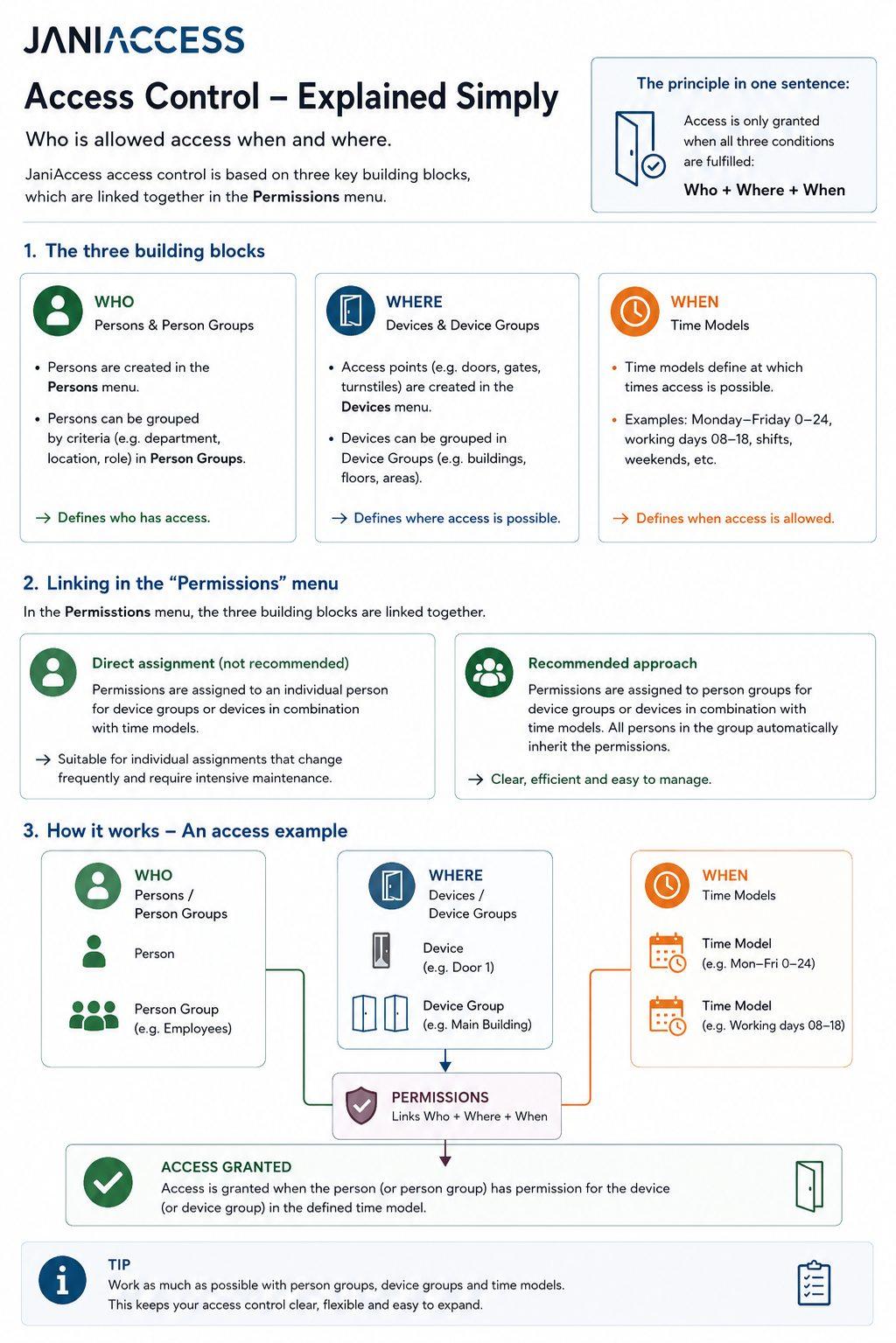](https://manual.drakos.de/uploads/images/gallery/2026-07/janiaccess-access-control-explained-simply-compressed.jpg)
JaniAccess access control is based on a simple principle:
> **Who is allowed to access which areas and when?**
Every access permission consists of these three components, which are linked together to determine whether access is granted.
---
# 1. Who? – Persons and Person Groups
The **Persons** menu defines **who** is allowed to access the system.
Individual users are created and managed in the **Persons** menu. To simplify administration, persons can be organized into **Person Groups** based on common characteristics such as department, location, role, or employment type.
**Examples of person groups:**
- Production Employees
- Office Staff
- External Contractors
- Cleaning Staff
Using person groups significantly reduces the effort required to manage access permissions.
---
# 2. Where? – Devices and Device Groups
The **Devices** menu defines **where** access is granted.
Each controlled access point (e.g. doors, gates or turnstiles) is configured as a device. Multiple devices can be combined into **Device Groups** to simplify permission management.
**Examples of device groups:**
- Main Building
- Production Area
- Administration
- Warehouse
- Outdoor Areas
Assigning permissions to device groups allows multiple access points to be managed with a single configuration.
---
# 3. When? – Time Models
The **Time Models** menu defines **when** access is permitted.
A time model specifies the days and times during which access is allowed.
**Examples:**
- Monday – Friday: 00:00 – 24:00
- Monday – Friday: 08:00 – 17:00
- Weekends
- Night Shift
- Holiday Schedule
Time models can be combined with any person, person group, device, or device group.
---
# 4. Assigning Permissions
The **Permissions** menu links the three building blocks **Who**, **Where**, and **When**.
Permissions can be assigned in two different ways.
## Option 1: Assign Permissions to Individual Persons *(Not Recommended)*
Permissions can be assigned directly to a single person by linking a device or device group with a time model.
**Example:**
John Smith → Main Entrance → Monday–Friday 08:00–17:00
This approach is suitable only for exceptional cases. As the number of individually assigned permissions grows, administration becomes increasingly complex and difficult to maintain.
---
## Option 2: Assign Permissions to Person Groups *(Recommended)*
The recommended approach is to assign permissions to **Person Groups**.
In this case, a person group is linked to a device or device group together with a time model.
Every person who belongs to that group automatically inherits the assigned permissions.
**Example:**
Person Group **Office Staff**
→ Device Group **Administration Building**
→ Time Model **Monday–Friday 08:00–17:00**
All members of the *Office Staff* group automatically receive these access rights.
This approach keeps the access control system structured, scalable, and easy to maintain.
---
# Summary
Every access permission is created using the same principle:
> **Best Practice:** Whenever possible, assign permissions to **Person Groups** instead of individual persons and use **Device Groups** together with **Time Models**. This approach keeps the access control configuration organized, scalable, and easy to manage, even in large installations.