Persons
You can manage the persons within the Time and Attendance module using the menu item Persons. Here you can also define supervisors for employees or specify substitudes for supervisors.
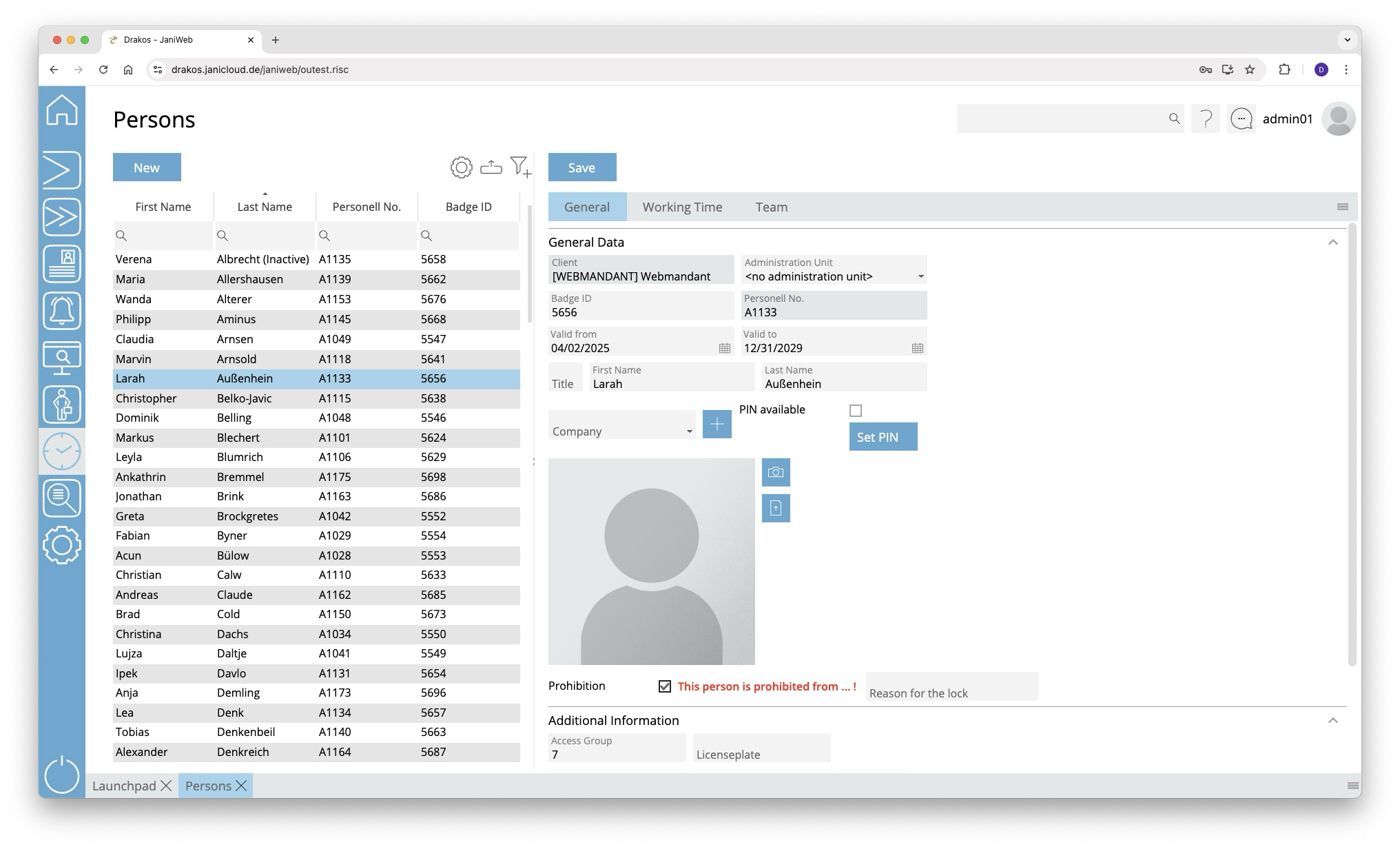
List of persons
The list contains the persons that have already been created. Select a person to view details.
The list offers the following options:
- Select columns to display: Press the gear icon. Select which columns you want to display and in which order. Arrange the columns using the mouse or the arrow icons. Press Apply to adopt the changes.
- Filter by client and status: Press the filter icon. Select the clients and the status (Active, Active in future, Inactive) for which persons should be displayed. Changes are visible immediately.
- Search in columns: Enter text or numbers in the search field (magnifying glass icon) of a column to search for names, personnel numbers, or other criteria. The entries take effect immediately: the list only displays hits.
Tip: Search for substrings. You can find “Spencer-Churchill” with “spe”, “chur” or “hill”. The search is not case sensitive. - Export the entire list: Press the download icon. Select the format in which you want to export the list. The export files are downloaded or displayed depending on the browser/operating system settings.For details on the available export formats, see the General > Export Formats chapter of this manual.
Button New
Press New to create a new person. Enter the required information about the person on the tab General Data and press Save.
Tab General Data
This is where you store and edit personal data. You can individually define which fields and areas are available here via Settings > tab General.
Personal data that is transferred from external systems (e.g. SAP) cannot be changed here. They must be edited in the respective source system.
Tab Working Time
- Leave: Enter the annual holiday for the person.
- Holiday Calendar: Select a holiday calendar for the person. This calendar will be considered in the Team Calendar for this person.
Tab Team
Select the Supervisor for the person. This determines the person to whom workflow requests for bookings and absences are forwarded. The supervisor is authorized to process such requests in the menu item Workflow.
In addition, supervisors can designate up to three Substitudes for themselves. During the substitution period, all workflow requests are also forwarded to the supervisor’s substitude.