
Basic Settings
Use the menu item Basic Settings to access all of JaniWeb’s general settings.
Changes made here may affect the application itself or its interfaces. Please only make changes here that you have discussed with your contact person.
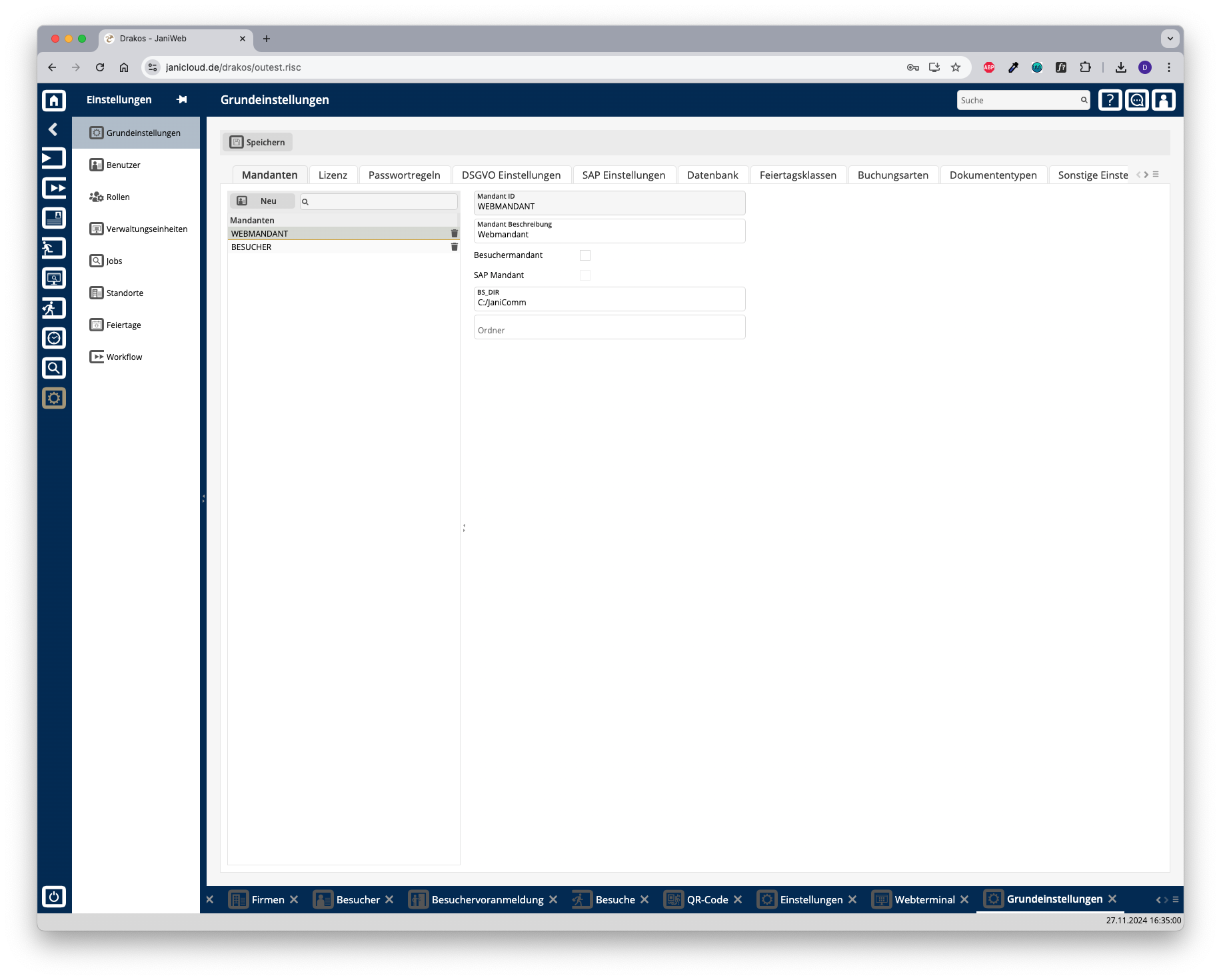
Tab Clients
This is where you manage different clients in the system. Clients describe the origin of the data and are linked to the objects (e.g. persons, devices, device groups, etc.). The list contains the clients that have already been created. Select an entry to view details.
Press New to create a new client. Enter the required data and press Save.
Detail area
Tab License
Here you can see which license you are using.
Tab Configuration
To use a new license, press Upload License File. Select the file provided by your contact person.
The list displays the features that are currently licensed.
Tab Monitoring
Any features whose use is restricted are displayed here together with their level of use.
If required, activate the option Alert for license violation for all users and enter a note.
Tab Password Rules
Specify the strength of the passwords used. Enter the minimum Password length and select the desired options for the composition of passwords.
Tab GDPR
Specify the number of days after which expired records are automatically deleted. This is also possible for the server log files.
Tab SAP Settings
Specify the number of days for which the backups of the SAP import files should be kept. You can also specify the file name for exported bookings.
Tabs General / Balance Data
Use these tabs to map the fields of an imported SAP record to the fields in JaniWeb.
Tab Database
Connection and other status information for the databases used is displayed here.
Information about the version of a function or procedure can be found in the column Comment.
Tab Holiday Calendar
Press New to create a new holiday calendar. Enter an ID and a Description. Use the respective trash icon to delete a holiday calendar.
Tab Event Types
This is where you can specify the booking types that should be available at the terminals. The booking types are also used for the web terminal. For each booking type, specify whether the booking is triggered by the device itself or by a person (e.g. clock-in, clock-out).
To set the Text for a booking type, press Translate. Enter the names for the respective languages and press Save.
Use the respective trash icon to delete a booking type.
Tab Document Types
This is where you can manage the document types that are available for selection on the tab Documents in the personal master data.
Tab Miscellaneous
This is where you can define which areas and tiles should be preset in the launchpad.
Area Launchpad Areas
Create areas here that will appear by default on the launchpad.
Area Visible Tiles
Create tiles here that are linked to a PDF or link. When the tile is pressed, the PDF or linked page opens.
To set the Text and the Description for a tile, press Translate. Enter the names for the respective languages and press Save.
Tab Login
Specify here how users log in.
Area Username and Password
If your system does not use LDAP login, you can assign fields from the HR master record as the Username and Password.
Select Own Password if the user should be able to set their own password. The user receives an Initial Password for the first login. Select a field from the personnel master record in the field of the same name.
Forgotten passwords can be reset. To do this, remove the corresponding entry from the list. The user must then log in again with their initial password.
Area Login Restrictions
Here you can specify which persons are allowed to log in to JaniWeb.
Tab Properties
This is where you make settings for the SMTP server, LDAP connection, database backup, and SAP exchange directory. Any changes made here require a restart of the Tomcat server.
Area Device Master Record Calculation
Area Device Models
Specify the various device types that can be selected in the menu Devices.
Area LDAP
Specify here the required settings for logging in via LDAP.
Area Email
Here you define the access data for the SMTP server used.
Area Master Record Lock
Activate the automatic master record lock here. You can specify after how many error attempts (number of failed attempts) within a certain period (time period in seconds) a master record should be locked. In addition, you can use the field event types to specify which booking errors should be taken into account.
Area SAP Settings
Make settings for updating SAP data here.
Area Database Backup
Here you can configure an automatic database backup. The backup is performed once a day at night.
Area Devices
Area Control Management
In the field control.management.filelocation, enter the directory in which parameter files for devices from the manufacturer Dormakaba are to be stored when they are created using control management.
Area Logging
In this area, you can use the field logs_directory to specify the directory to be sent to the recipients (specified in the field logs_recipients). Press Send logs to start sending.
Area License Violation
Specify the threshold from which you would like to be informed about the current license usage.
license_violation_email_recipient: Enter the email address to which license violation information should be sent. Press the plus icon to add additional email recipients.
Area Other
Here you can define various other basic settings.
Tab Literals
This is where you can edit the terms used in the JaniWeb user interface (tab Literals) and Help texts for various languages.
IMPORTANT: If you change the terms used in the user interface, the operating instructions will no longer match the product. Drakos assumes no liability for the consequences of such changes.
Tab Import
You have the option to initially import personnel master records from a CSV file. The following fields describe a personnel master record. Entries with an X in the column Mandatory must be filled.
A sample file for importing persons in CSV format can be found here: Sample Personen CSV Import
Texts for functions
Columns
sprache char(2) ISO language identifier from hrcc1dnperso01 => langu_iso. If the language is not represented DE is used.
hersteller_id char(3)
Manufacturer from term_down => manufacturer_id
satza char(2) Terminal eventtype of the booking. If it is not present, the record type will fall back to an empty string
sapsatza char(3) SAP eventtype (e.g. P10, P20) which should be transferred to SAP. If this field is filled, the hrcc1upteven01 is operated.
sapinfo char(8) SAP additional information, which is transmitted in customer_field_1. Mainly for P60 (e.g. }{AM0001).
antwort varchar(50) Comma separated Semicolon separated
Static response text to the terminal.
iform char(50)
Specifies on which page the spaces for stretching are output on the length of the dynamic texts specified in the ilen field. R stands for right-justified text and thus for the left side. With L it is exactly the other way around.
info char(100)
Comma separated Semicolon separated
Dynamic response text to the terminal. Is mainly read from hrcc1dnbalan01.
ilen tinyint(2) Determines the length with which the fields for info are read left-justified. If the field is 0 or empty, the function section is skipped.
db char(50) Comma separated
Number in seconds in which a dynamic posting error is searched for backwards.
ppc char(50) Regex field comma separated
One or more record types which trigger the dynamic posting error. A preceding exclamation mark negates the field.
pps char(50) Regex field comma separated
describes all entries that are to be held against for checking. The triggering entry must also be represented.
ppe char(50) comma separated
Reference to the record type in field satza, which is to be used when triggering.
statv varchar(50)
comma separated
has two fields, which provides the text for a coming and a going response in case of a status tracing.
Can only be used in connection with a sapsatza P01 or SNN. With P10 the status is checked 10 hours in the past, but a P01 posting is also transferred to SAP. With SNN, NN specifies the number of hours until the reset. In this case, a P10 or P20 entry is also transferred to SAP.
anhang char(14) Defines a fixed booking attachment which will be set if the booking does not have its own booking attachment.
anhang_flag char(5)
Defines how the accounting attachment is to be interpreted.
24x7 tinyint(1) OBSOLET Overwrites the time profile check.
Additional Information
Terminal group from term_down => htyp. If no match is found, DEFAULT is used. These 4 columns declare from where to start loading the options for a booking. sprache
ISO language code from hrcc1dnperso01 => langu_iso. If the language is not available, DE is used. hersteller_id D, K, PCS Manufacturer from term_down => hersteller_id satza
Terminal record type of the booking. If not available, the record type falls back to an empty string. sapsatza
SAP record type (e.g. P10, P20) to be transferred to SAP. If this field is filled, hrcc1upteven01 is served. Fields for hrcc1upteven01 sapinfo
Additional SAP information, which is transmitted in customer_field_1. Mainly for P60 (e.g. }{AM0001). security answer
Comma separated Semicolon separated
Static response text to the terminal. Field antwort 1 / field info 1
The texts of the two fields are concatenated.
Field antwort 1 / fields info x
antwort is output first, followed by all info fields with the length specified in ilen.
Fields antwort x / fields info x
A field from antwort and one from info are displayed alternately.
Fields are separated by commas.
The fields separated by a semicolon are applied in the anhang_flag field with the saldo flag set. info name, statv, info1, info2, info3, info4, info5, info6, info7, info8, info9, infoa, imail, zmail, lbook Comma separated Semicolon separated
Dynamic response text to the terminal. Is mainly read from hrcc1dnbalan01. iform R, L Specifies on which side the spaces are output for stretching to the length specified in the field of the dynamic texts. R stands for right-aligned text and thus for the left side. With L, it is exactly the other way around. ilen
Determines the length with which the fields for info are read, left-aligned. If the field is 0 or empty, the function section is skipped. db
Separated by commas
Number of seconds searched backwards for a dynamic booking error. If a dynamic booking error is triggered, this refers to a new line in the funktion_texte. The original 4 fields (gruppe, sprache, hersteller_id and satza) are queried again, regardless of whether one or more of the criteria could not be found. This means that even if the sentence type, for example, was not available in the language langu_iso, the new check still starts with this.
Dynamic booking errors can take the form of double bookings, plausibility checks, booking sequences and replacement bookings.
Attention: This function can be used to configure an endless loop that is not intercepted by the dmgr function! ppc
Regex field Separated by commas
One or more record types that trigger the dynamic posting error. A leading exclamation mark negates the field. pps
Regex field Separated by commas
Describes all postings that should be held against the check. The triggering posting must also be represented. ppe
Separated by commas
Reference to the record type in the field satza, with which the program should continue when the trigger occurs. statv
Separated by commas
Has two fields that provide the text for a clock-in and clock-out response when tracking status.
Can only be used in connection with a sapsatza P01 or SNN. With P10, the status is checked for a flat rate of 10 hours in the past, but a P01 booking is also transferred to SAP for this. With SNN, NN indicates the number of hours until the reset. In this case, a P10 or P20 booking is also transferred to SAP. anhang
Defines a fixed booking attachment, which is set if the booking does not have its own booking attachment. anhang_flag anab, costc, extwa, saldo Defines how the booking attachment is to be interpreted.
anab Causes the attachment to be written to the att_abs_reason field in hrcc1upteven01.
costc Causes the attachment to be written to the costc field in hrcc1upteven01.
extwa This is only defined, but does not yet fulfill any function.
saldo If this flag is set, an integer is expected as a booking attachment. This number then selects the respective field from the columns antwort and info, separated by semicolons. If the number is larger than answers and infos are defined, the last field is used. 24x7
OBSOLET Overrides the time profile check.
Examples
Terminal replies
0 Returns a simple “R1” to the terminal. By setting ilen to 0, the function skips reading hrcc1dnbalan01 and formatting the values, thus saving processing time. R1Hello name L 20 Outputs a booking confirmation, a greeting, and the name from hrcc1dnperso01 left-aligned, limited to 20 characters. It is important to ensure that the correct number of spaces is inserted after the greeting to obtain a line break. The length specified in ilen does not influence the response! R40 info1,info2,info3 R 8 First outputs an “R40” and then outputs the fields info_1, info_2 and info_3 from hrcc1dnbalan01, fixed to 8 characters, right-aligned. R1Hello,Balance: name,info_1 L 20 First “R1Hello” is displayed, then the name (20 characters long, left-aligned), the text “Balance: ” and finally the info_1 field from hrcc1dnbalan01. Again, make sure that the number of spaces in the column antwort is correct so that the texts are properly indented on the terminal. R40 info1,info2,info3;info4,info5,info6 R 8 If the anhang_flag is set to saldo, an integer is expected in the booking attachment. This determines which of the fields separated by semicolons is selected. If the integer is greater than the number of fields, the last field is selected. In this example, if the value is 2, the only available field in antwort and the second (i.e. info4-6) would be used.
Dynamic booking error